Upgrade from SuperCell to Quanto
For IFRA allergen labs moving from MassHunter Quant + SuperCell to a single Quanto batch.
SuperCell solved a hard IFRA problem: four acquisition methods, four MassHunter Quant batches, and a decision tree across polarities, SIM sets, and dilutions. Quanto keeps that science — and removes the scaffolding.
SuperCell today
- 4 methods × 4 Agilent Quant instances
- Data files must be translated for MassHunter
- Fixed multi-batch grid + decision tree
- External Quant always in the loop
Quanto instead
- 1 method, 1 batch, no external Quant
- Loads un-translated ChemStation
.Dfiles - AcqKey / SmpKey replace the four-batch layout
- Ease of use and speed are unmatched — highly customizable, fast reports and exports
1. Process overview
2. SuperCell file naming (fixed scheme)
SuperCell expects a strict naming pattern so the four methods and dilutions line up.
| Piece | Meaning |
|---|---|
QC1 | Instrument 1 — apolar column |
QC2 | Instrument 2 — polar column |
SS1 / SS2 | SIM set 1 / SIM set 2 |
| Methods | QC1_SS1.M, QC1_SS2.M, QC2_SS1.M, QC2_SS2.M |
| Data file | QC1_SS1_SAMPLENAME_1000.D (example dilution token 1000) |
3. How that maps in Quanto
| Quanto field | Role for IFRA / SuperCell upgrades |
|---|---|
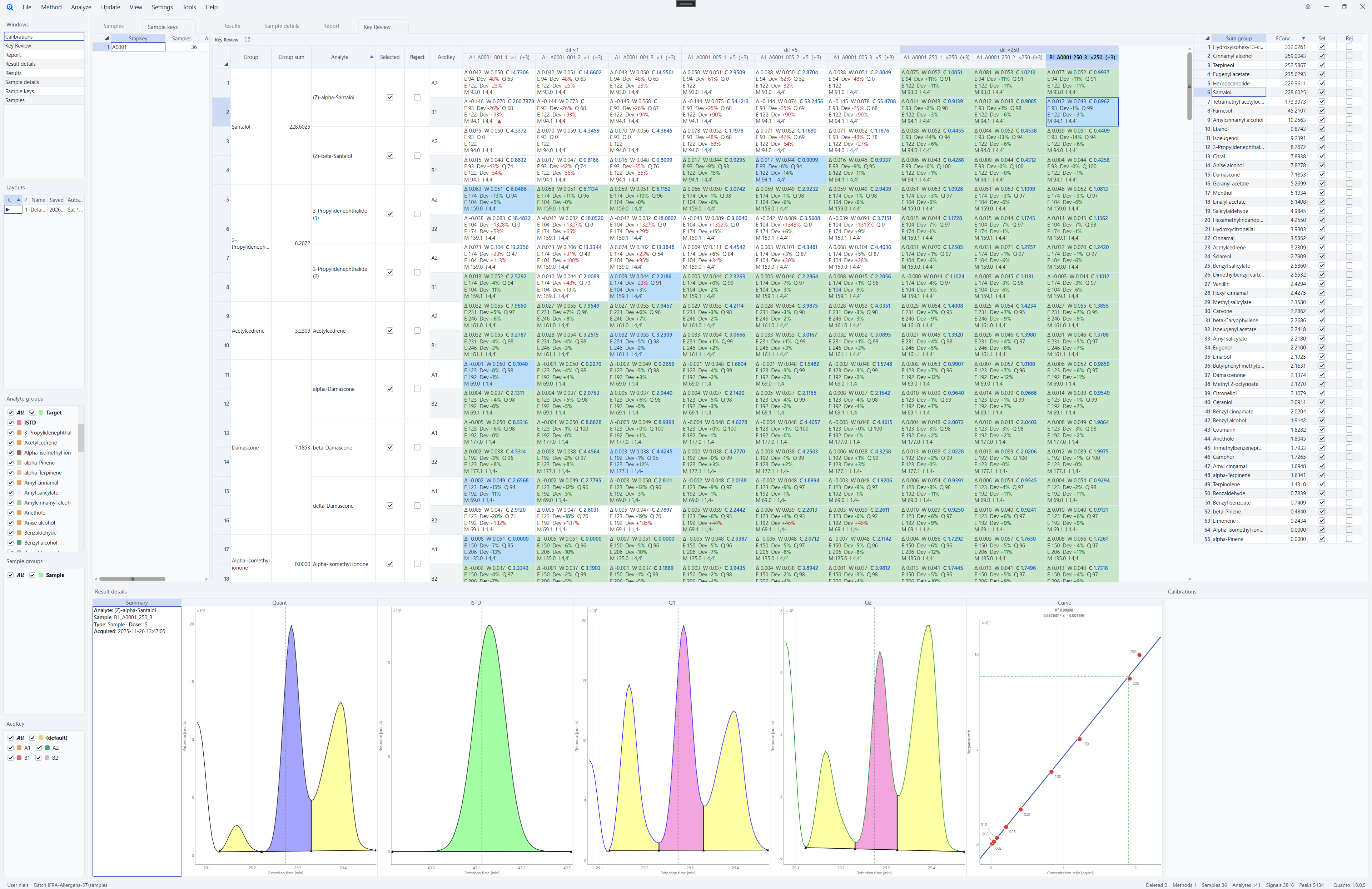
| AcqKey | What SuperCell treated as a separate Quant method/batch — e.g. QC1_SS1. Analyte names may repeat across AcqKeys; the pair (name + AcqKey) is unique. |
| SmpKey | Logical sample / bottle. Injections with the same SmpKey are combined for review (Key Review picks winners across AcqKeys). |
| Dilution | Per injection. Values such as 10, 9, 11, 11 on the four AcqKeys are recognized as the same dilution group (rounded power of 10) unless you override. |
| Extraction table | On the method. RegEx from file name / path → AcqKey, SmpKey, SampleType, Dose, Dilution when you Add samples. |
Related guides: Method design, Sample metadata extraction, Key Review.
4. Analyte names and groups
In SuperCell, compounds with identical Group Names are summed for the IFRA total. Suffixes on names such as Farnesol and Galaxolide define which peaks belong together so that all bracket / isomer numbers are present without duplicating the group.
On the apolar column (QC1), Farnesol (1) and Farnesol (2), and Galaxolide (1) and Galaxolide (2), are treated as co-eluting peak pairs — the suffixes keep the required bracket numbers while the shared group name still sums correctly.
5. Reviewing data
For reviewing data, use Sample keys and Key Review views.
6. Suggested upgrade checklist
- Install Quanto and open the IFRA example batch / method (see Getting started).
- Inspect the method’s extraction table — confirm RegEx match your
QC*_SS*_…names (or adapt them). - Confirm analyte names / groups (Farnesol, Galaxolide, …) match your SuperCell Compound Groups.
- Add a small set of un-translated ChemStation
.Dfiles; verify AcqKey, SmpKey, and Dilution fill correctly. - Run Analyze, review with Key Review across AcqKeys, then try a report/export template.
- Scale up: append remaining AcqKeys / historical methods as needed (Append import → new AcqKey).
7. Why labs switch
- One tool — no four Quant instances, no translation pipeline.
- Native ChemStation — load
.Das acquired. - Speed — interactive review; batch recalculation in well under a second on typical IFRA-sized methods.
- Customization — Excel-like reports and exports without fighting MassHunter report templates.
Questions or a guided migration on your data: [email protected]. Product pages: Quanto · SuperCell.