Quanto pre-release
Calibrate, review, and report fast for Agilent QQQ GC/LC-MS, SCIEX, Shimadzu, and Waters — in structured spreadsheet-style sheets. Labs seem to look for unifying and high-productivity tools.

Why analysts use Quanto
Stay in flow while you review
About 100,000 signals in ~5 seconds on a 20-core laptop. After a manual integration, calibrate and quantitate in under 500 ms — so you keep reviewing instead of waiting.
Same review across Agilent QQQ GC/LC-MS, SCIEX, Shimadzu, and Waters
Single- and triple-quad in one product. Native loaders for MassHunter, OpenLab CDS, ChemStation, SCIEX, Shimadzu LabSolutions, and Waters MassLynx — open the batch and review the same way.
Spreadsheet-style review, in-app
500+ spreadsheet functions plus Quant-aware Q.* formulas, chromatograms and curves in the sheet, dynamic arrays and lambdas — build the review and report you need without fragile workbook sprawl.
Configurable for your method
Methods, grids, reports, and workflows adapt to how you work — multi-dilution, mixed acquisitions, qualifiers-as-quantifiers, and more.
Capabilities in more detail
The features analysts reach for day to day.
Single- and triple-quad instruments
One review experience for SQ and QQQ GC/LC-MS workflows — including Agilent QQQ GC/LC-MS, SCIEX, Shimadzu, and Waters fleets common in large lab networks.
Data loaders
SCIEX, ChemStation (native — no translation step), Agilent MassHunter, OpenLab CDS (.dx / AcqData), Shimadzu LabSolutions (.lcd / .gcd / .qgd / .lrd), and Waters MassLynx (.raw folders). More can be added through add-ins — alongside method importers, integrators, and view add-ins.
Integrators
Fast native Quanto integrator today. Add your own (or AI-assisted) integrators through the add-in API without rewriting the app.
Add-in for Views
Ship custom review panes as DLLs (grids, side panels, or full screens) that appear under View → Add-in views. Labs get the overview technicians need for their SOP; drop a DLL or zip on the running window to load or replace a view — build once, drop on the window, keep reviewing. Example view add-ins ship under AddIns\View. For programmers: programmers page and the View add-in SDK.
Copy & paste integration
Copy peak integration and paste it onto multiple charts in one go.
Method Editor (in progress)
Several testers asked for a better Method Editor — development continues. The Analyte designer is still cooking; this alpha advances preview (full chromatogram/spectrum, TIC → spectrum at RT, zoom to extraction window), quantifier/qualifier from spectrum sticks, Mixed polarity, and stricter Get Signals CE/fragmentor/polarity matching when Use flags are on.
Methods
Import from MassHunter, ChemStation, OpenLab CDS (.pmx), SCIEX, Shimadzu LabSolutions (data + .lcm / .gcm / .qgm), Waters MassLynx (from .raw), batch/data, or create manually. Extra sources can be added through add-ins.
Batch recalculation in under 200 ms
E.g. a pesticides method with ~100 samples and ~500 analytes. After you manually integrate a calibrator or ISTD, the whole batch updates automatically.
Multi-standard calibration
Methods with hundreds of compounds across several bottles and dose levels, sharing the same ISTD — one coherent calibration instead of awkward workarounds.
Blank offset
Curve-origin blank intercept like MassHunter: Blank use (average / previous / bracket), blanks-used after Analyze.
Blank concentration
Method-blank subtraction on concentration toward NativeConc (separate from blank offset; Offset wins if both set).
OpenLab CDS
Read OpenLab data (.dx / AcqData) and import processing methods (.pmx) alongside MassHunter, ChemStation, SCIEX, Shimadzu LabSolutions, and Waters MassLynx.
CalGroup & standard addition
Group bottles that share a curve; run normal Calibration or StdAdd mode in the same batch.
Result limits & flags
RecPct / DevPct / RecFlag, MinCurveR2, response and qualifier limits, plus a Method Validation pane.
Multiple curve fits per analyte
E.g. a curve on the 3 lowest doses and one on all 5 — Quanto automatically picks the result from the curve where the response fits best within the curve.
Mixed acquisition methods
Combine acquisitions in one batch — e.g. dioxins with PCBs, or the full IFRA Allergens workflow across polar/apolar and SIM sets.
Multi-dilution
Samples at several dilution factors in one review — Quanto picks the best peak that falls within the calibration range and is least diluted.
Best qualifier as quantifier
Treat every qualifier as a quantifier with its own calibration curve, then automatically pick the lowest peak that still meets the qualifier limits.
Recovery & reporting limits
Set recovery limits and reporting limits per matrix and analyte — or import them per sample and analyte.
Familiar spreadsheet-style review
Review and report like a power spreadsheet — inside Quanto: 500+ spreadsheet functions, Quant-aware Q.* formulas, chromatograms and calibration curves in-grid, dynamic arrays and custom lambdas.
Batch workspace
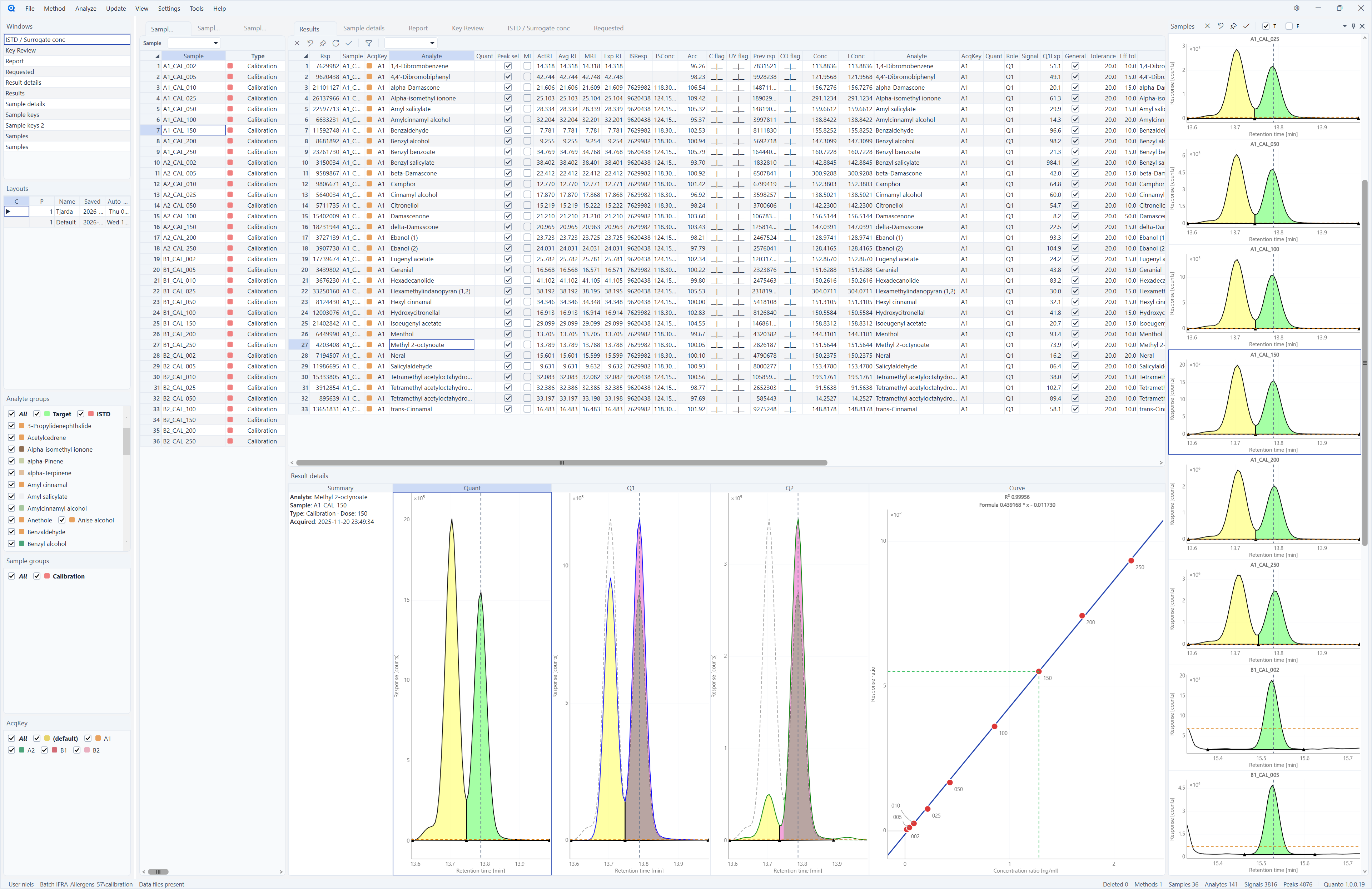
Samples, analytes, signals and peaks with dockable panels and thumbnail chromatograms.
Define Import / Report / Export
Automate workbook workflows from the designer ribbon.
Screenshots
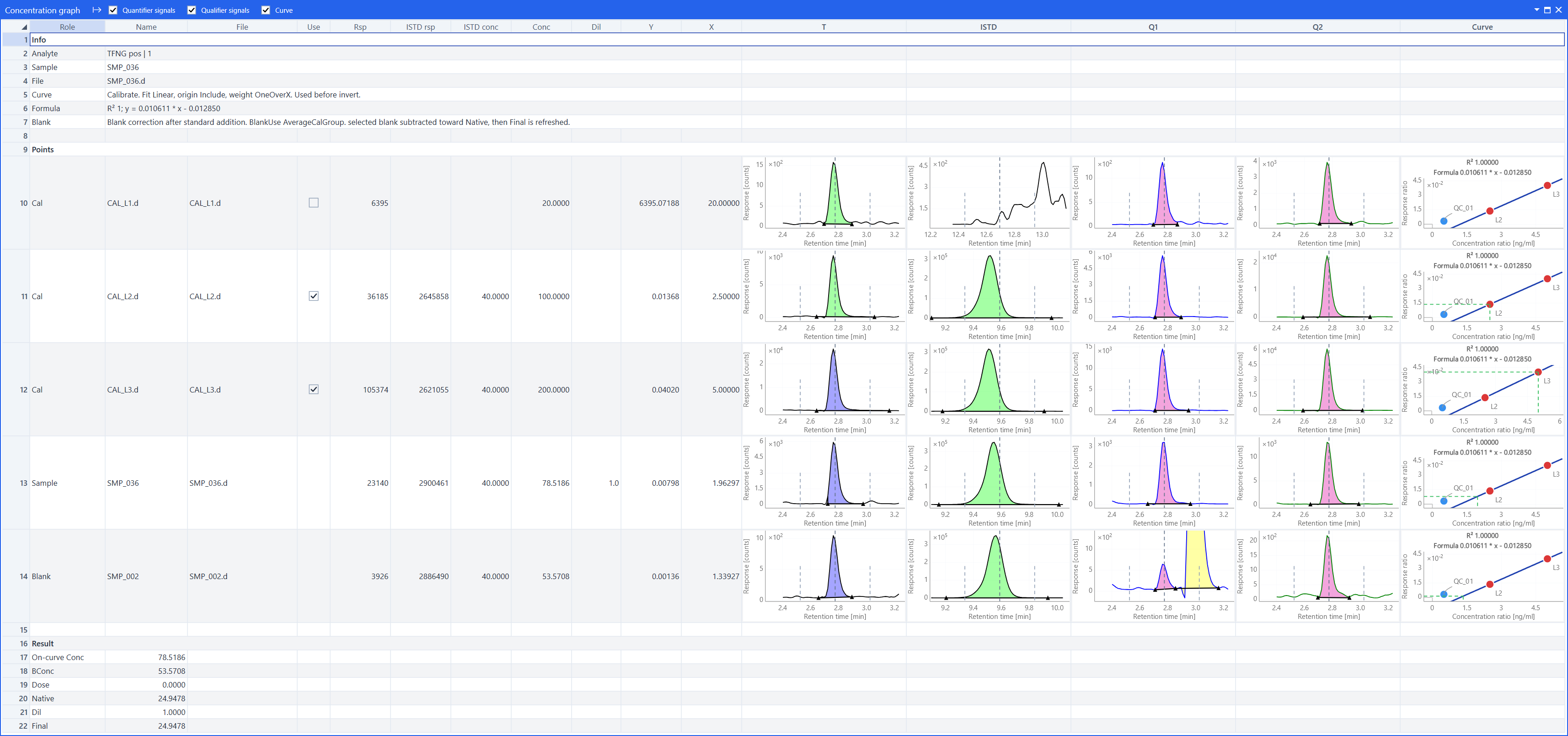
Concentration graph, batch review, reports.
Get help from AI
Stuck on a screen, a calculation, or an outlier flag? Your AI bot can read Quanto’s docs and product details with you.
Ask for a quick overview of the feature you’re using, step-by-step help for the workflow in front of you, or a clear explanation of how a concentration, flag, or report template works — without digging through manuals yourself.
Documentation for analysts
Getting started, method setup, blanks, calibration, review, reports, and more — HTML and PDF.
Changelog
What changed in each alpha build — full changelog.
Lab managers, IT & programmers
Enterprise ownership and fleet story on the managers page. Deploy, licensing, and support on IT. Add-ins, source structure, tests, and CI on the programmers page.